Settings Guide
The Settings page is where you set up your company in Argonautas: your contact details and branding, the defaults every property follows, the languages you work in, your messaging channels, how guests pay, and the outside services you connect. Open it from Settings in the Admin section of the sidebar.
Everything you save here applies to your own company only. Other businesses on the platform have their own settings, and nothing you change here affects them.
Two things are not managed here:
- Users and their roles have their own page, Users & Roles, also in the Admin section of the sidebar. See Users and Roles.
- Your own preferences (your password, your alerts, and your own Gmail mailbox for guest replies) are on your Account Settings page. Click your avatar in the top-right corner and choose Profile. See Managing Your Own Account.
Who Can Open Settings
Which tabs a person sees depends on their roles (see Role-Based Permissions):
| Tab | Administrator | Property Manager | Accounting |
|---|---|---|---|
| Payments | Yes | Yes, unless the banking restriction is on | Yes |
| Every other tab | Yes | Yes | No |
- A person with the Accounting role who is not also an Administrator or Property Manager sees just the Payments tab, and Settings opens straight on it.
- Reservations and Concierge roles don't see Settings at all.
- Only an administrator sees the banking-restriction checkbox at the top of the Payments tab.
The Tabs at a Glance
| Tab | What it holds |
|---|---|
| Company | Company name, website, contact details, default concierge contact, country, currency, timezone, branding, calendar colors, and contact-form routing |
| Property defaults | Stay rules and check-in/check-out times, house rules, quiet hours, damage deposit, payment terms, guide defaults, emergency contacts, and cancellation policies |
| Languages | The languages your guest content is written in, and the machine-translation provider |
| Messaging | WhatsApp, SMS, email, live chat, and OTA message channels, and saved replies |
| Payments | Payment providers (connectors) and the banking restriction |
| Factura electrónica | Costa Rica electronic invoicing: issuers, their Hacienda connection, which properties each one invoices, and CABYS line codes. See Factura Electrónica |
| Integrations | Maps, PMS import, Google Calendar sync, Rentals United, AI photo captioning, and Smart Home |
| Agent commissions | Company-wide commission rules, the monthly sales threshold, and default rates for salespeople |
| Booking sources | Where bookings come from, their management-commission rates, and which automated messages each sends |
On a phone, the row of tabs is replaced by a drop-down menu at the top of the page. Pick a tab from it.
The open tab is part of the page address (for example /settings?section=payments), so you can bookmark a tab or share a link to it. Links written before the tabs were merged still work: they open the tab that now holds that content.
Saving Your Changes
The Company, Property defaults, and Languages tabs each have one save bar. It slides up at the bottom of the page as soon as you change something, with "You have unsaved changes", Cancel (puts the tab back as it was), and Save Changes. If you try to leave Settings with unsaved changes, Argonautas asks first.
The other tabs, and a few cards inside the first three (logo and icon uploads, cancellation policies, and the translation provider), save on their own with their own buttons.
Company
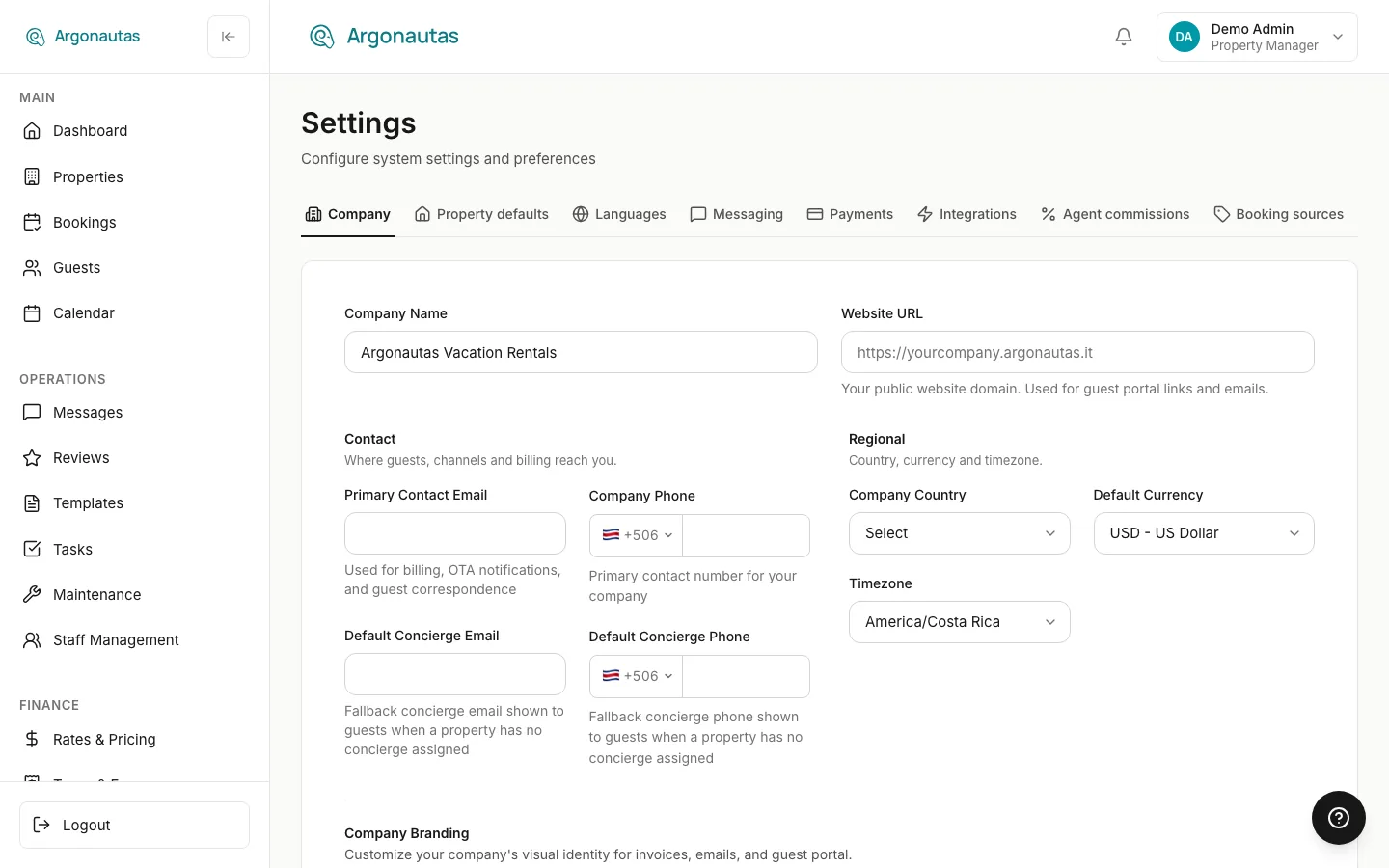
Company Details
| Field | What it's for |
|---|---|
| Company Name | Your business name. |
| Website URL | "Your public website domain. Used for guest portal links and emails." You can type a bare domain such as www.example.com; Argonautas adds https:// for you. |
The Contact group ("Where guests, channels and billing reach you."):
| Field | What it's for |
|---|---|
| Primary Contact Email | "Used for billing, OTA notifications, and guest correspondence." It is also where contact-form enquiries go when no other address is set (see Contact Form Routing). |
| Company Phone | "Primary contact number for your company." The field has a country-code picker. |
| Default Concierge Email | "Fallback concierge email shown to guests when a property has no concierge assigned." It fills the concierge email variables in message templates for any property without an online or onsite concierge, so those variables never come out blank. |
| Default Concierge Phone | The same fallback for the concierge phone variables. Per-property concierges are assigned on the property's Staff tab; these company defaults are used only where a property has none. |
The Regional group ("Country, currency and timezone."):
| Field | What it's for |
|---|---|
| Company Country | Your country of operation. It also sets the default country code on the phone fields on this tab. |
| Default Currency | Your company's default currency, chosen from a list grouped by region (North America, Central America, the Caribbean, South America, and Europe). |
| Timezone | Your operating timezone: Costa Rica, New York, Los Angeles, or London. Scheduled daily tasks and time windows such as smart-lock door codes follow it. |
Company Branding
"Customize your company's visual identity for invoices, emails, and guest portal."
- Company Logo: click Upload Logo. Recommended 400x100px, PNG or SVG, up to 2MB. The logo is saved as soon as it uploads; Remove takes it off.
- Company Icon: click Upload Icon. A square image, recommended 200x200px, up to 1MB.
- Brand Colors: Primary, Secondary, Accent, and Accent Deep. "These colors appear on invoices, confirmation emails, and guest-facing pages." Pick a color or type its hex code, and use the reset arrow to go back to the default. Colors are saved with the tab's Save Changes.
Your logo and colors also brand the payment page guests see from a payment link. See Branded Payment Pages.
Calendar Colors
Calendar colors sets how the booking calendar colors each villa's row. Pick one of six themes: One color (no row tints), Soft, Watermelon Sorbet, Neutral Harmony, Summer Fun, or Summer Melody. Each card previews the six colors the theme uses. You can change one villa's color from the dot next to its name on the calendar.
Contact Form Routing
"Send each contact-form category to a different address. Leave a category blank to use your primary email."
Enter an email for any of the five categories: Booking a Villa, Group Retreats, General Question, Concierge Services, and Property Management. Blank categories go to your Primary Contact Email.
Automated Emails
Below the routing fields, a note reads "Automated guest and owner emails are switched on and off in the message templates." with an Open message templates link. Turn each lifecycle message on or off in your Lifecycle Templates. You can also stop specific messages per booking source (see Booking Sources).
Each person's own alerts (sounds, browser notifications, and emails about new guest requests) are set on their own Account Settings page, not here. See Users and Roles.
Property Defaults
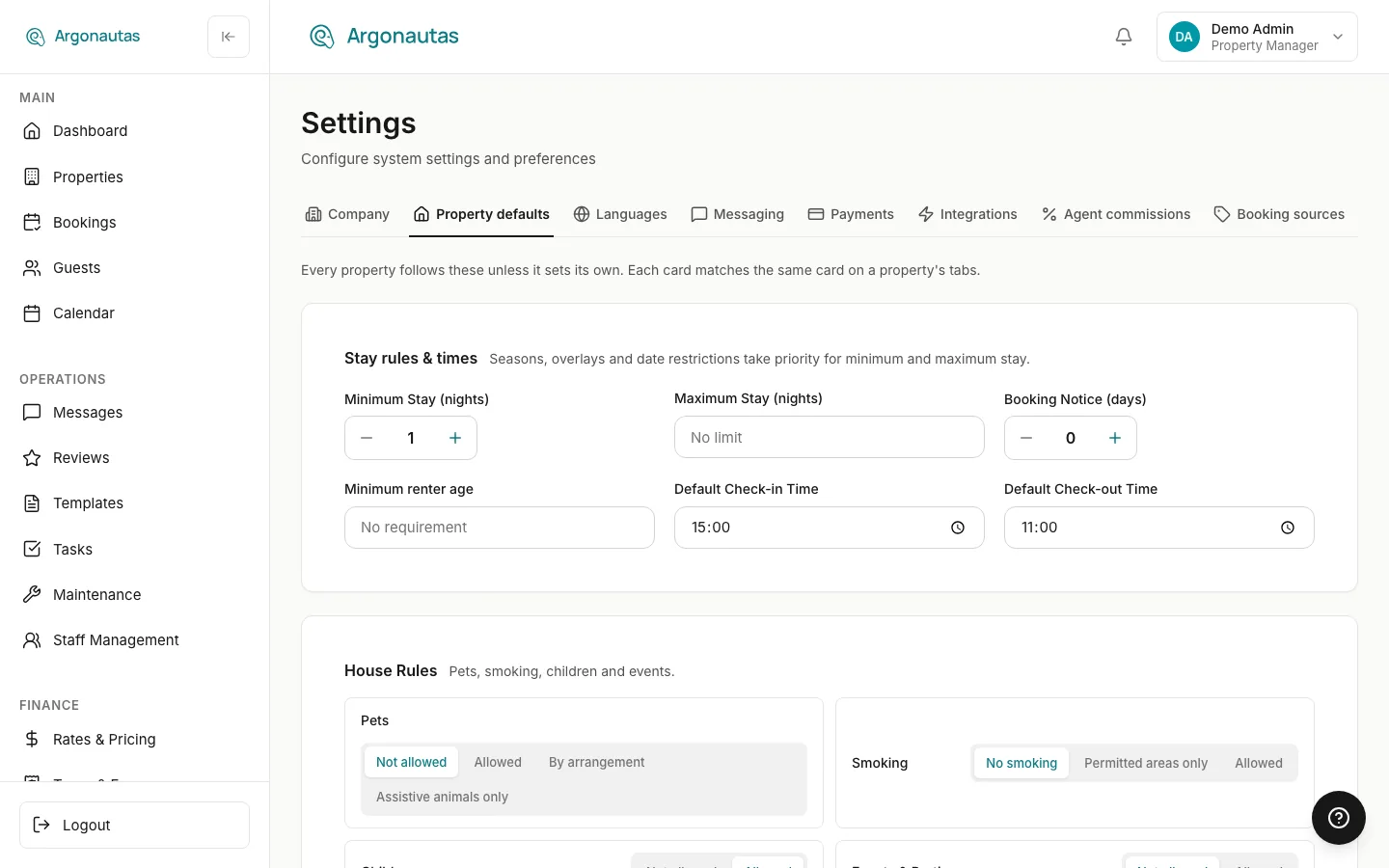
"Every property follows these unless it sets its own. Each card matches the same card on a property's tabs."
Airbnb Booking Settings
Booking settings on Airbnb ("Check-in and check-out times, cancellation policy, pets, smoking, children and events. Instant Book and your welcome message stay in Airbnb.") sets whether Argonautas keeps a connected Airbnb listing's own booking settings matching Argonautas's: Off (Argonautas sends nothing), Send our changes (a change you make in Argonautas is sent; an edit made directly in Airbnb stays until that setting changes here again), or Keep Airbnb matching (Airbnb always shows what Argonautas has; an Airbnb edit is put back within a day, with a notice). Applies to every property with a connected Airbnb listing, unless a property sets its own on its Property tab. See Airbnb Booking Settings.
Stay Rules & Times
| Field | What it does |
|---|---|
| Minimum Stay (nights) | Fewest nights a stay may have. Used on dates where no season, overlay, or date restriction sets a minimum. |
| Maximum Stay (nights) | Most nights a stay may have. Used on dates where no season or date restriction sets a maximum. Leave it empty for No limit. |
| Booking Notice (days) | Minimum days between booking and arrival. 0 allows same-day bookings. |
| Booking Window | How far ahead guests may book: Not set, No limit, or 30 to 365 days. Arrivals later than this are closed on your website and every OTA, and Airbnb's own setting follows it. See Booking Window and Unpriced Dates. |
| Minimum renter age | "The person making the booking must be at least this age. Shown to guests; not checked." Leave it empty for No requirement. |
| Default Check-in Time | The check-in time shown to guests on confirmations, vouchers, the guest portal, and your website, and used for smart-lock codes. |
| Default Check-out Time | The same, for check-out. |
Which rule wins. For minimum and maximum stay, the most specific rule wins: a date restriction first, then a rate overlay, then the season, and the company default last. A season always carries its own minimum stay, so the company minimum mainly covers dates with no season, and properties whose rates come from an imported PMS without a minimum. See Minimum Stay Rules.
Where the rules apply. Your website, guest checkout, and the booking form all check them. An arrival inside the booking-notice window is refused on the website. In the booking form it appears as a rule you can override for a last-minute booking you take yourself. Properties connected to OTAs through Argonautas send the same rules to every channel: stay limits go with your rates, and the booking-notice window is sent as closed-to-arrival dates that move forward each day.
Per-property overrides. On a property's Property tab, Check-in Time, Check-out Time, and Booking Notice (days) each have a Use company default switch. Turn it off to give that property its own value. Turn it back on to follow the company again. See Property Setup.
House Rules, Quiet Hours, and Damage Deposit
- House Rules ("Pets, smoking, children and events."): pick one option for each rule.
- Pets: Not allowed, Allowed, By arrangement, or Assistive animals only.
- Smoking: No smoking, Permitted areas only, or Allowed.
- Children and Events & Parties: Not allowed or Allowed.
- Quiet Hours: a Start and End time.
- Damage Deposit: a Type (None, Preauthorization, or Charged) and an Amount. With Preauthorization two more fields appear: Review Days After Departure (1-6 days before the hold is released automatically) and Notice Days Before Arrival (1-7 days before arrival that the guest is told about the deposit). See Security Deposits.
Payment Terms
"Default deposit and balance collection settings for all properties. Partners and properties can override these."
- Deposit Percentage: "Percentage of total collected at booking (100% = full payment upfront)."
- Balance Due: how many days before arrival the remaining balance is due.
How deposits and balances are collected from guests is covered in Payments & Billing.
Guide Defaults and Emergency Contacts
"Set company-wide default content for property guides. Properties can inherit, extend, or override these defaults."
Write the Default House Rules, Default Local Recommendations, Default Check-in Instructions, and Default Check-out Instructions. A language switch at the top of the card picks which of your content languages you are editing.
Under Default Emergency Contacts ("People guests can call during their stay."), click Add Contact and fill in a name, a role, and a phone. Click Done to close the row, or Edit to open it again. See Villa Guide.
Cancellation Policies
A table of your cancellation policies with their Tier, Free Cancellation Days, and Refund After Cutoff (%). Click Add Policy to create one: a Policy Name, a Tier (Flexible, Moderate, Strict, Non-Refundable, or Custom), the two numbers, an optional Airbnb equivalent (one of Airbnb's own cancellation categories, kept matching on every connected Airbnb listing that uses this policy; leave it blank to manage that listing's Airbnb cancellation policy yourself), and a Description (shown to guests), then Save. Each row's menu offers Set as Default, Edit Policy, and Delete. The default policy is marked Default.
Cancellation policies are saved one at a time from this dialog, not with the tab's Save Changes.
Languages
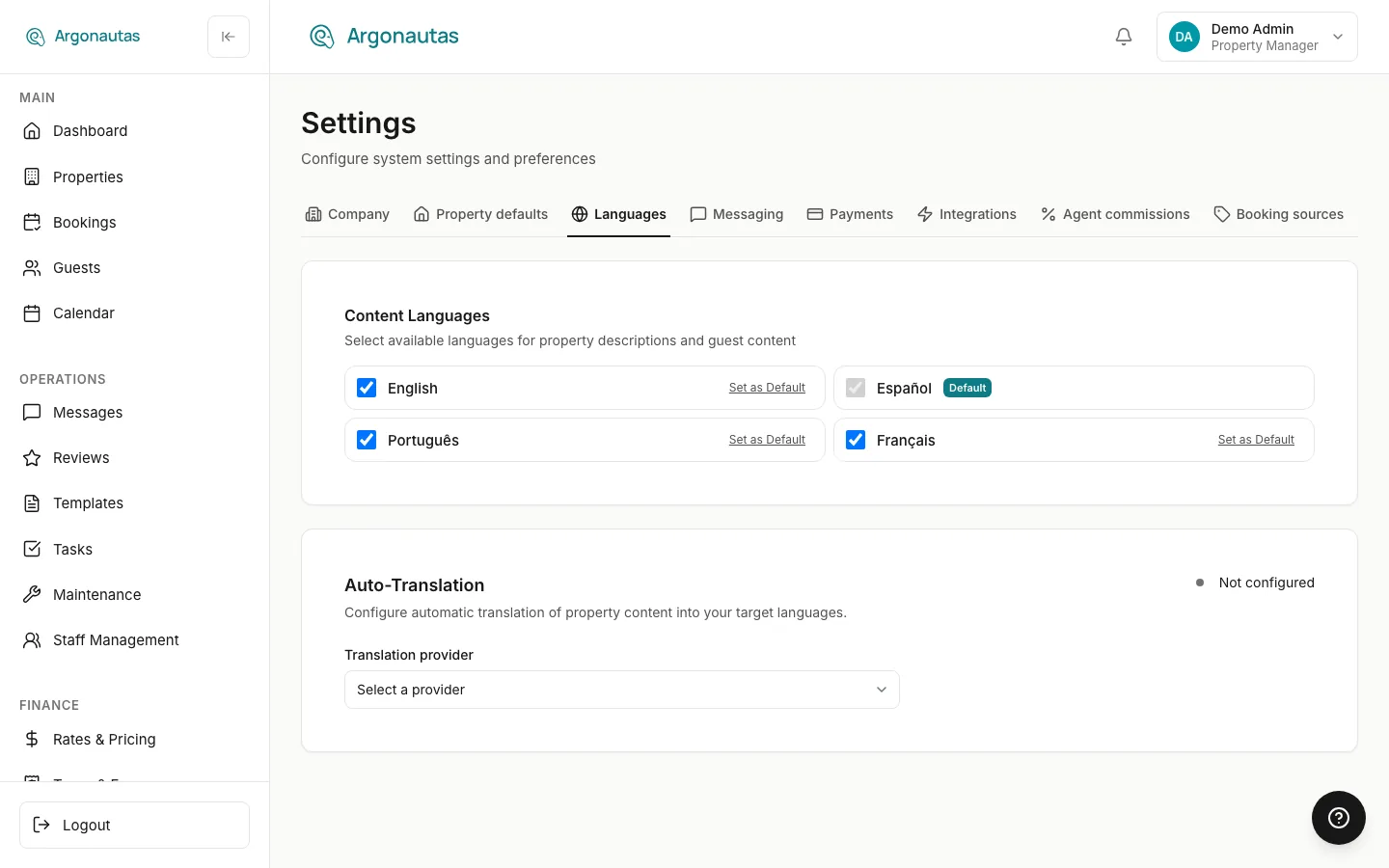
Content Languages
"Select available languages for property descriptions and guest content." Tick each language you maintain. One of them is marked Default. To change it, click Set as Default next to another ticked language. The default language can't be unticked.
The content languages decide which languages you can edit on multilingual fields such as the guide defaults on the Property defaults tab.
Your own interface language is not set here. Each person picks it from the Language section of their avatar menu in the top-right corner. It changes only their own screens.
Auto-Translation
The Auto-Translation card ("Configure automatic translation of property content into your target languages.") sets up machine translation of your property content into your content languages.
- Choose a Translation provider: LibreTranslate, DeepL, OpenAI, Google Cloud Translation, or DeepSeek.
- Enter that provider's credentials. The fields depend on the provider.
- Click Test Connection, then Save & Activate.
One provider is active at a time. You can store credentials for another provider and switch to it later. A stored provider shows "Credentials saved — activate to switch". For every provider except LibreTranslate, "Billing handled directly by [the provider]. Argonautas does not charge for translation usage."
Once a provider is active, the Behavior card has two switches: Enable Translation and Auto-translate on save ("Automatically translate content when property details are saved."). For AI providers (OpenAI and DeepSeek), a Translation Style card adds a Style preset (Neutral (default), Formal, Casual, Marketing-friendly, or House rules clarity) and an optional Custom instruction.
Messaging
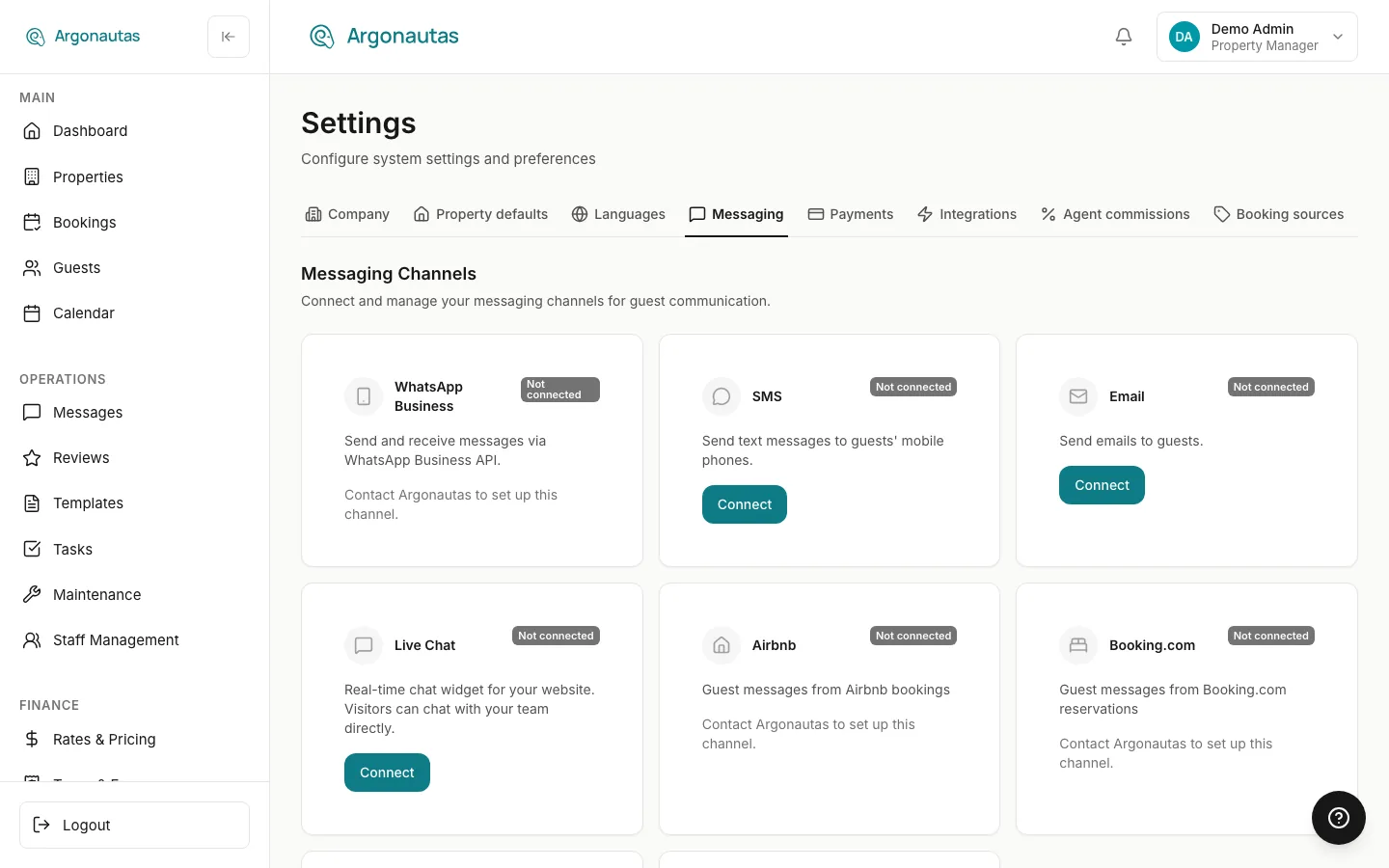
Messaging Channels
"Connect and manage your messaging channels for guest communication." Each channel has a card. Connected channels are listed first, then channels you haven't connected, then those marked Coming soon.
| Channel | How it's set up |
|---|---|
| WhatsApp Business | Set up with Argonautas: an unconnected card reads "Contact Argonautas to set up this channel." Once connected, the card shows the webhook status, with Register Webhook if inbound messages aren't arriving. See WhatsApp Setup. |
| SMS | Click Connect and Select a phone number from your messaging workspace. Alphanumeric sender IDs are marked Alphanumeric. Each connected number gets its own card, and you can connect more than one. |
| Click Connect to open Configure Email, which walks you through choosing a provider (Gmail, Zoho, Office 365, SendGrid, Postmark, Resend, or Custom SMTP), entering credentials, and Test & Connect. You set the From Name, From Email Address, and an optional Reply-To Address for guest replies to automated messages. | |
| Live Chat | The chat widget for your website. Click Connect to turn it on. Configure then shows the Embed Snippet to paste on your site and the widget options (listed below). |
| Airbnb, Booking.com | Guest messages from those OTAs. These are set up with Argonautas. Once linked, the card shows Connected. |
| Facebook Messenger, Instagram | Coming soon. |
Live chat options: Primary Color, Text Color, Position (Bottom Right or Bottom Left), Welcome Message, Away Message, Allowed Domains (leave empty to allow all), Force widget offline (visitors can still leave a message), and Closed dates (holiday dates when the widget is offline all day).
SMS Routing by Country: once an SMS number is connected, you can limit it to guests in certain countries by adding country codes (for example US). A number with no codes shows All countries (no filter).
Send Guest Replies From Your Inbox
Connecting your own Google (Gmail or Workspace) mailbox, so your replies to guests are sent from and saved in your own mailbox, is a personal setting. It is no longer on this tab. Open your avatar menu, choose Profile, and use the Send guest replies from your inbox card on the Profile tab of Account Settings. See Managing Your Own Account and Sending Replies From Your Own Mailbox.
Saved Replies
Saved Replies are "Quick responses for common guest questions. Use /shortcut in the message composer." Click New Reply to add one. Each reply has a title, a shortcut, a category, and a scope: company-wide, one property, or personal. You can search and filter the list by scope and category.
Payments
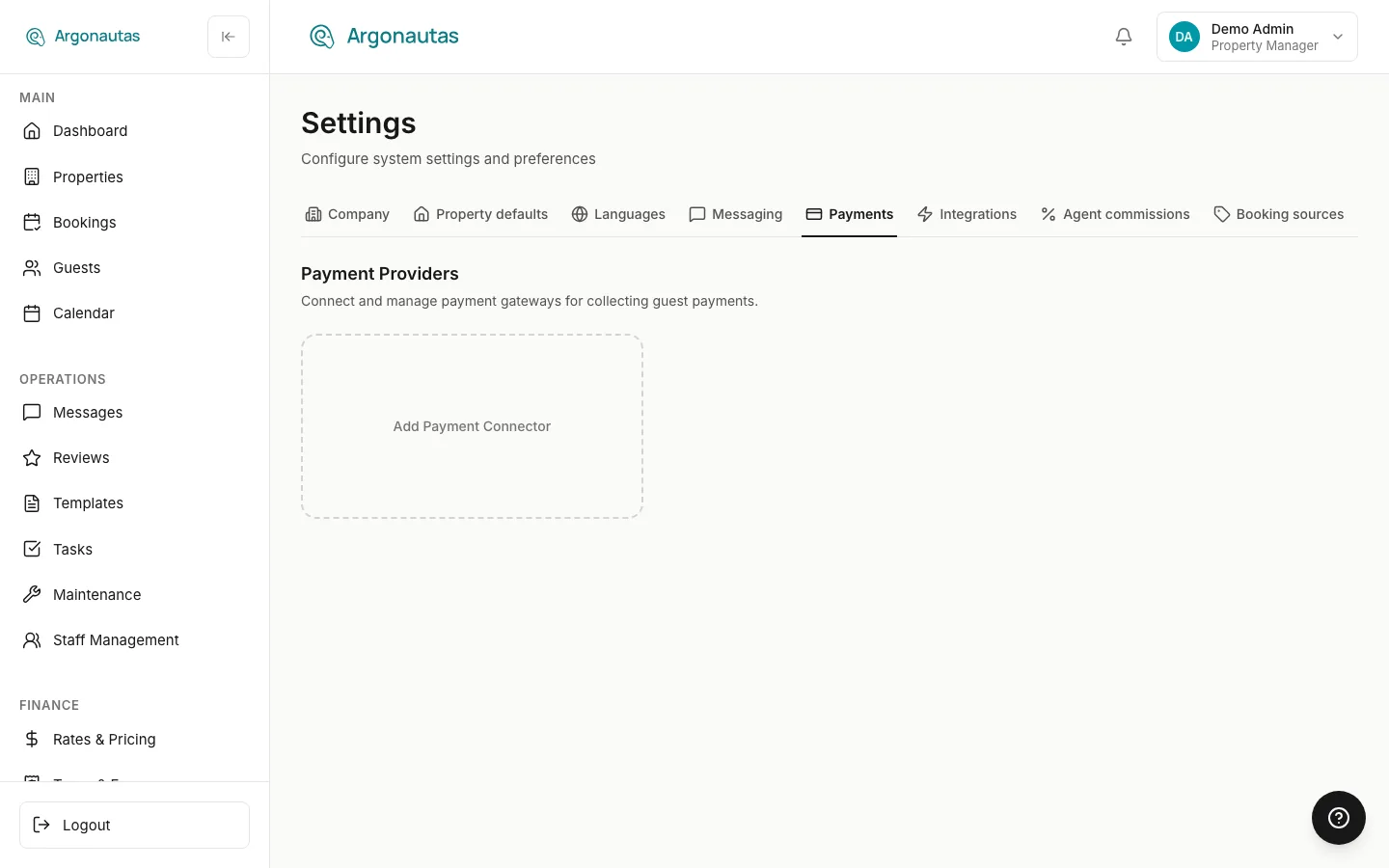
The Payment Providers tab ("Connect and manage payment gateways for collecting guest payments.") is where you connect the services that take guest payments. How guests see and use them is covered in Payments & Billing.
The Banking Restriction
At the top of the tab, administrators see the checkbox Banking details visible to Accounting and Admin only: "Property managers lose access to payment connectors and owner bank details. Everyone can still send payment links and record payments." See The Banking Restriction.
Payment Connectors
Click Add Payment Connector and Select a payment method type:
| Connector | Description shown | Key fields |
|---|---|---|
| PowerTranz | "BAC/FAC Credomatic card processing for Central America." | PowerTranz ID, PowerTranz Password, the payment page settings, and the recurring merchant credentials |
| PayPal | "Accept PayPal and card payments globally." | Client ID, Client Secret |
| Stripe | "Full-featured payment platform with cards, wallets, and more." | Publishable Key, Secret Key, Webhook Secret |
| Bank Transfer | "Wire transfer instructions sent to guest." | Bank Country (which sets the banking fields shown), bank and account details, and Additional instructions |
| Cybersource | "Cybersource / Visa Acceptance card processing (Promerica)." Shown with the Cybersource and Banco Promerica logos. | Merchant ID, Key ID, a Shared Secret or a Private Key (PEM), and Response MLE Key ID |
Every connector also has:
- Display Name: "Internal name to distinguish connectors. Not shown to guests."
- Environment: Sandbox for testing or Production for real payments (not shown for bank transfer).
- Processing Fee: No fee, Flat fee, or Percentage, plus a label shown to the guest, for example "Wire transfer fee". It's charged per payment, isn't taxed, and isn't shared with the owner. See Payment Processing Fees.
- Property Assignment: All properties (default), or Specific properties that you tick.
- Enable this connector for guest payments: turn a connector off without deleting it.
Each connector's card shows its status, its environment, and whether it covers all properties or a number of them, with Configure, Test Connection, and Disconnect. Disconnecting removes the connector and its credentials.
Which Connectors a Guest Is Offered
You can have several active connectors at once, for example a card processor and a bank transfer. For each property, Argonautas offers the guest the enabled connectors that cover it, one for each payment type. If a type has both an All properties connector and one assigned to that specific property, the property's own connector is used for that type.
Integrations
This tab collects the outside services Argonautas connects to. Cards you don't use can be left alone.
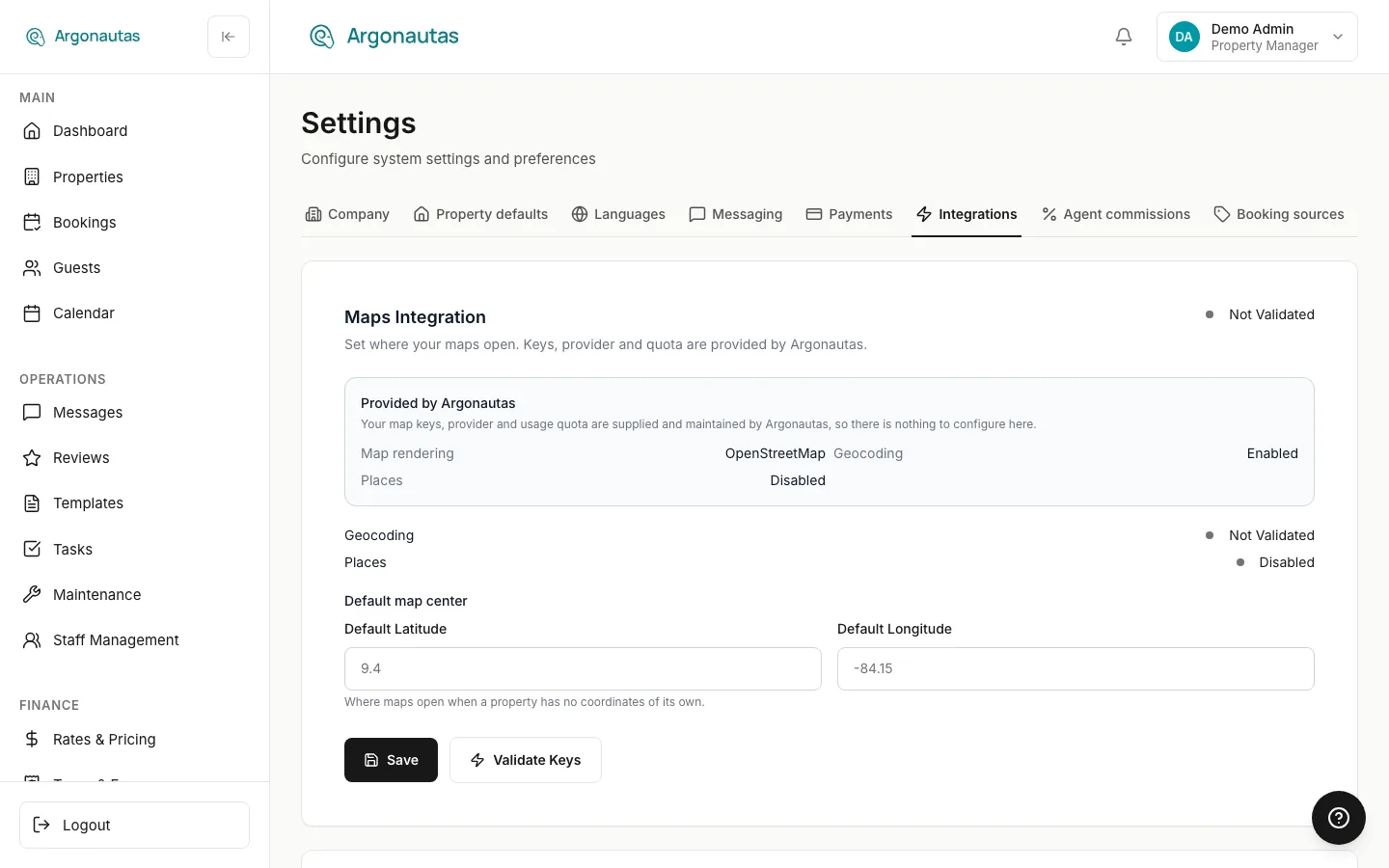
| Card | What it does | Details |
|---|---|---|
| Maps Integration | Map keys, provider, and quota are Provided by Argonautas, so there's nothing to configure except the Default map centre (Default Latitude and Default Longitude): "Where maps open when a property has no coordinates of its own." Click Save to store it. Validate Keys checks that Geocoding and Places are working. | -- |
| Property management system | Imports properties and bookings one way from Beds24 or Hostfully. The card only appears once Argonautas support has switched the integration on for your company. | PMS Integrations |
| Sync bookings to Google Calendar | Connect a Google account so each property's bookings are written to one of its calendars. The Property calendar mapping table below it lists every mapped property with Pause, Resume, and Resync. | Google Calendar Sync |
| Rentals United | "Channel manager integration for OTA distribution." Shown only to companies whose channel provider is Rentals United, with API Username, API Password, and Test Connection. Other companies' channel connections are managed from the Channel Manager. | Channel Integration |
| AI Photo Captioning | Generates English captions and room types for uploaded photos with Google Gemini, using your own Gemini API key. Turn on Enable AI captioning, and optionally set the Model and a Caption style instruction. | AI Caption Suggestions |
| Smart Home | Two sections. Climate connects Sensibo air-conditioning accounts (Connect Sensibo account). Locks connects your company's Tuya lock project (Connect Tuya project). Both list every connection, labeled Company or with the owner's name, including accounts connected from a villa for its owner. Devices are assigned to villas on each property's Smart Home tab. | Smart Home, Smart Locks |
Payment providers are not on this tab. They have their own Payments tab.
Agent Commissions
Agent Commission Settings ("What agents earn: their share of the company's commission on each booking.") sets the company-wide rules for salesperson commission:
- Include fees in commission base: whether cleaning and other fees count toward the base. IVA and other taxes never do.
- Monthly sales threshold: "Sales each agent must reach in a month (accommodation without tax, by arrival date) before earning commission. Only sales above it earn." It has its own Save button. Saving recalculates every unpaid commission. Paid commissions never change. Enter 0 for no threshold.
- Default agent: "Credited on bookings with no agent tagged. Leave empty to credit no one."
- Default rates by booking source: an Active switch and a Rate for each source, grouped into OTA Channels and Direct Channels. Rates are a percentage "of company cut".
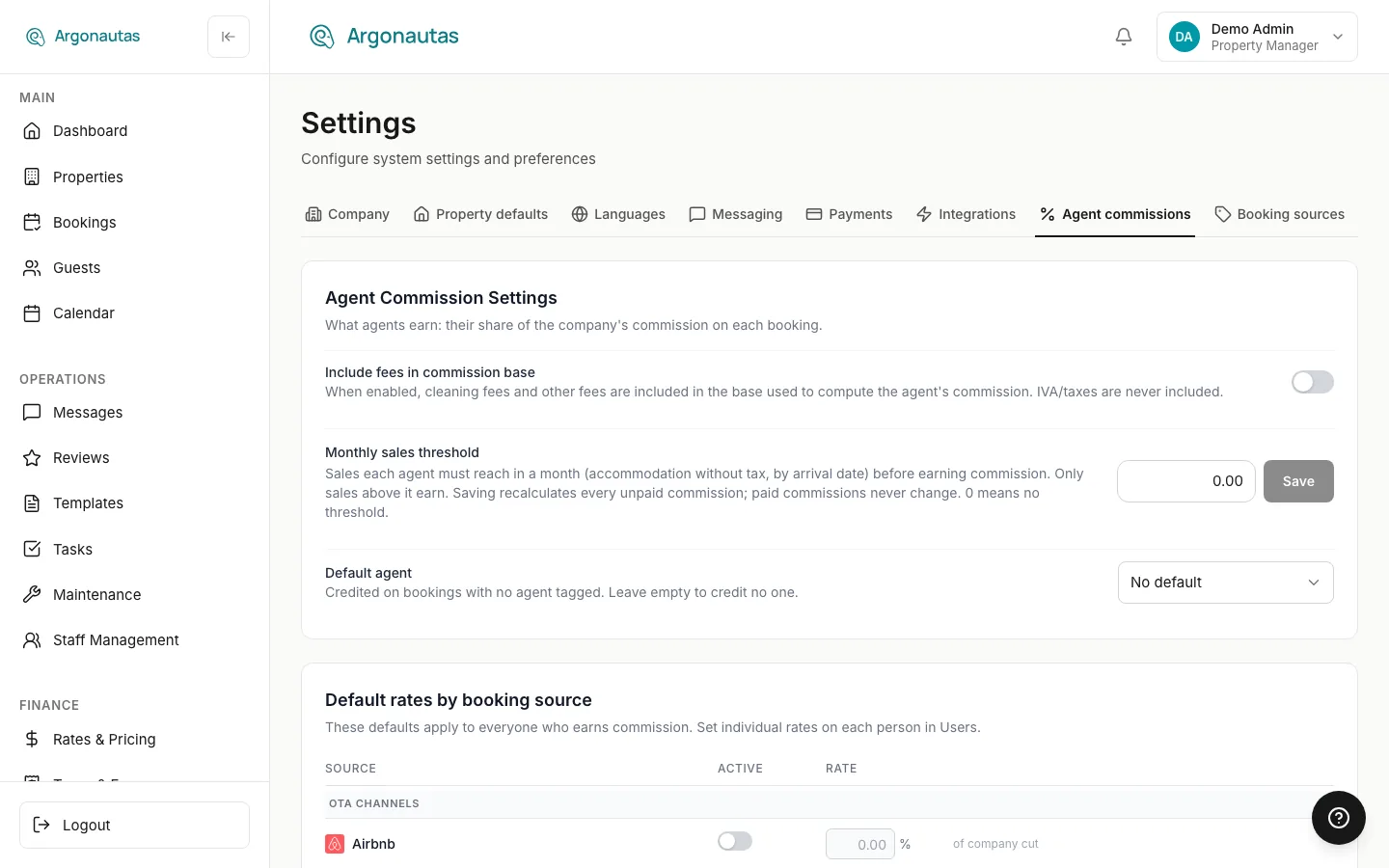
These defaults apply to everyone who earns commission. Individual rates are set on each person in Users & Roles. See Agent Commissions and Individual Commission Rates.
Booking Sources
Booking Sources ("Your management commission for each booking source. Blank inherits the property's rate.") lists where your bookings come from, with each source's Name, Code, Commission %, and Active switch, and a Save button on each row. Built-in sources are marked System. Click Add source to add a custom one. See Booking Sources.
Expand a source with the arrow at the start of its row to see its message settings, where you can stop specific automated messages for bookings from that source. See Automated Messages by Source.
Key Concepts
- Per-company settings: Everything in Settings applies to your own company only.
- Company defaults and property overrides: Payment terms, stay rules, house rules, and villa guide content set on Property defaults are defaults. Partners and individual properties can override them.
- Your own preferences: Your interface language, your personal alerts, and your own Gmail mailbox belong to you, not the company. They live in your avatar menu and on Account Settings.
- Payment connector: One connected payment service (PowerTranz, Stripe, PayPal, bank transfer, or Cybersource), assigned to all properties or to specific ones.
Common Questions
Why do I only see the Payments tab? You have the Accounting role but not Administrator or Property Manager. Accounting gives access to payment setup but not to the other settings. See Role-Based Permissions.
Why can't I see the Payments tab? You're a property manager and an administrator has turned on the banking restriction. Ask an administrator to make payment changes. See The Banking Restriction.
Where did the General, Notifications, Booking Defaults, Policies & Rules, Language, and Translation tabs go? They were merged. General and Notifications are now Company. Booking Defaults and Policies & Rules (with payment terms) are now Property defaults. Language and Translation are now Languages. Old links open the new tab.
Where do I connect my Gmail to reply to guests? On your own Account Settings page: avatar menu › Profile, then the Send guest replies from your inbox card. Connecting is optional. Without it, your replies are sent through the company email channel.
Where do I add users or change someone's role? On the Users & Roles page in the Admin section of the sidebar, not in Settings. See Users and Roles.
Can I use more than one payment provider? Yes. Add as many connectors as you need. Guests are offered each enabled connector that covers their property.
What happens when I change a property default? Every property that follows the company default picks up the change straight away, including the rules sent to your OTA channels. Properties with their own value are not affected, and existing bookings keep their dates.
Will changing the default currency affect existing bookings? No. Each booking keeps the currency it was made in.
I don't see the Property management system card. Argonautas support switches it on per company. See PMS Integrations.
Related
- Users and Roles: Adding team members and choosing their roles.
- Role-Based Permissions: What each role can do, including the banking restriction.
- Payments & Billing: How guests pay through your connectors.
- Agent Commissions: How salesperson commission is calculated and paid.
- Booking Sources: Sources and their management-commission rates.
- Automated Messages by Source: Turning off messages for one source.
- PMS Integrations: Importing from Beds24 or Hostfully.
- Google Calendar Sync: Writing bookings to Google Calendar.
- Smart Home and Smart Locks: Climate control and door codes.
- WhatsApp Setup: Connecting WhatsApp Business.
- Branded Payment Pages: Your logo and colors on payment links.
- Messaging Guide: The unified inbox.