
Booking Sources
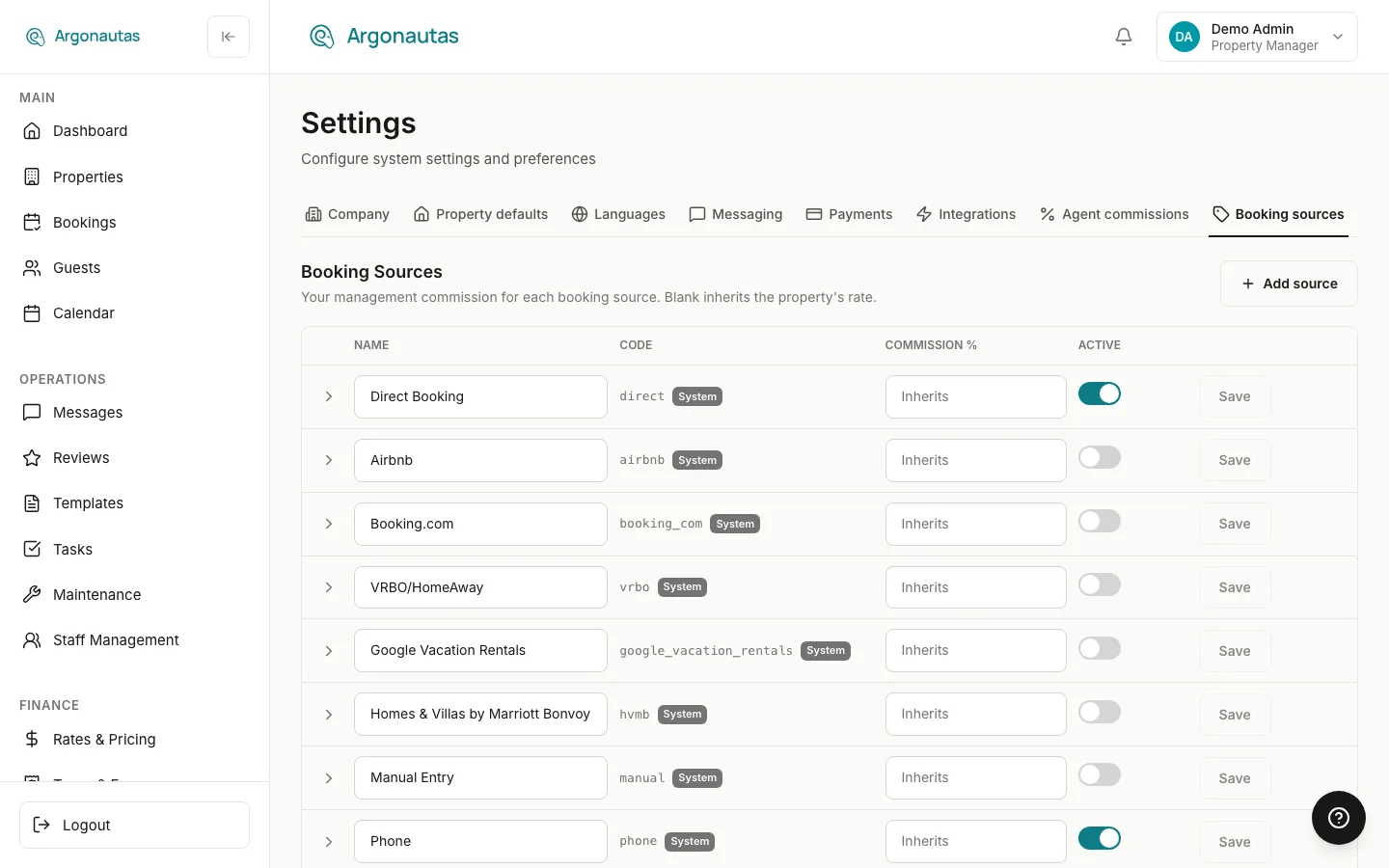
A booking source records where a reservation came from: Direct, Airbnb, Phone, a repeat guest, a partner referral, and so on. Beyond reporting, the source now drives money: it determines the management commission applied to a booking, and it feeds the base used for agent commissions. Argonautas keeps every source in a per-company registry you control from the Booking sources tab of Settings.
Overview
Each company starts with a set of built-in system sources and can add its own custom sources. For each source you can:
- Set a management-commission rate that applies to bookings from that source.
- Deactivate a source you no longer use (it disappears from the source dropdown without touching any historical booking).
- Override the rate per property when a specific villa charges differently for that source.
Because a booking stores its source as a simple code, the source is resolved live every time a figure is calculated. Re-classifying a booking's source updates its commission everywhere the next time a report, statement, or owner payout is generated. Nothing is frozen at booking time.
System Sources
Every company is seeded with these system sources:
| Code | Name | Type | In dropdown by default |
|---|---|---|---|
direct | Direct Booking | Direct | Yes |
phone | Phone | Direct | Yes |
email | Direct | Yes | |
agency | Travel Agency | Direct | Yes |
cpl | Complimentary (CPL) | Direct | Yes |
other | Other | Direct | Yes |
airbnb | Airbnb | OTA | No (hidden) |
booking_com | Booking.com | OTA | No (hidden) |
vrbo | VRBO/HomeAway | OTA | No (hidden) |
google_vacation_rentals | Google Vacation Rentals | OTA | No (hidden) |
manual | Manual Entry | Direct | No (hidden) |
referral | Referral | Direct | No (hidden) |
repeat | Repeat Guest | Direct | No (hidden) |
System sources carry a System badge. Their code cannot be changed, and like all sources they can never be deleted, only deactivated. You can still edit their commission rate and toggle them active or inactive.
The Curated Dropdown
New companies start with a curated source dropdown: only the sources a person actually reaches for when adding a booking by hand appear in the menu. The rest are seeded but hidden (deactivated), because offering them for manual entry causes confusion or duplicate bookings:
- OTA channels (Airbnb, Booking.com, VRBO, Google Vacation Rentals) arrive automatically through your channel manager, which stamps the source itself. Choosing one by hand risks a duplicate.
- Manual Entry is an entry method, not where the guest came from.
- Referral is word-of-mouth attribution with no commission role. The referrer's name goes in the booking's free-text Referral field instead. The two referral kinds that do carry commission are a custom Owner Referral source and the built-in Travel Agency.
- Repeat Guest is a loyalty signal, not an acquisition channel.
This is purely a dropdown-visibility choice. Hiding a source never touches money or existing bookings, and if your team genuinely records OTA bookings by hand (no channel manager), you can re-activate any hidden source from this page. Travel Agency and Complimentary (CPL) ship active because they are things you record by hand:
- Travel Agency tags a booking that an external agency originated, and unlocks the agency commission split (see below).
- Complimentary (CPL) marks a gifted or owner-comp stay. A CPL night carries $0 and is deliberately left out of occupancy, revenue, and ADR math. It neither counts as a sale nor as a night you failed to sell.
Custom Sources
If your team books through channels the system list doesn't cover (a wholesaler, a corporate account, an owner who forwards their own reservations), add a custom source:
- Go to Settings and open the Booking sources tab.
- Click Add source.
- In the Add a custom source form, enter a Name (e.g. "Owner Referral"), a Code (a short slug such as
owner_referral), and an optional Commission %. - Click Add source in the form. The new source appears in the table and in the source dropdown on the booking form.
Custom sources behave exactly like system sources for commission and reporting.
Setting Commission by Source
The commission rate on a source is the management commission: the share your company retains from the owner's revenue on bookings from that source. Enter a percentage in the Commission % column and click that row's Save button. Each row saves on its own, and Save stays grayed out until the row has a change.
Leave the field blank to have that source inherit the property's own management-commission rate. This is the common case: most sources inherit, and you only set an explicit rate on the sources that differ.
How the Rate Is Resolved
For any booking, Argonautas resolves the management-commission rate in this order:
- Per-property override for that source (if one exists). It always wins.
- Company source rate: the Commission % you set on the source in this page.
- Property's base management-commission rate: the property's own configured rate.
- Company base commission: the Base management commission % at the top of this page (30% unless you change it), for any property with no rate of its own.
A property override of 0% is a real, explicit rate ("this source is commission-free at this property"). It is not the same as leaving the field blank, which means "inherit."
Per-Property Overrides
When a single property charges a different rate for a given source, set an override on that property rather than changing the company-wide source rate:
- Open the property and go to its Property tab.
- Find the Per-source commission overrides card ("Sources not listed here use their default commission."). A new property has to be saved once before the card can be used.
- Pick a source from Add override for a source…, enter the property-specific Commission %, and click Save.
- To go back to the source default, remove that source's override.
Overrides are the top of the resolution ladder above, so they take precedence over both the company source rate and the property's base rate.
Travel Agency Bookings
When an external travel agency sends you a booking, tag it with the Travel Agency source and link it to the specific agency on the booking form. The agency then earns a share of the management commission on that booking, paid as a separate commission payout.
You manage your agencies and each agency's share from Agency Payouts in the Finance section of the sidebar (click Manage agencies), not on this page. The Travel Agency source here still resolves a management-commission rate for the booking the same way every other source does; the agency's cut is taken from that commission afterward. If a reservations agent also handled the booking, they earn their own commission on what remains. The full split is explained in Agent Commission Settings.
Re-classifying a Booking's Source
You can change the source on any booking from the booking detail view, including bookings that arrived through an OTA. The source is an internal classification used for commission and reporting; it is never pushed back to the channel, so re-classifying an Airbnb or VRBO booking cannot desync the reservation with the OTA.
A common use: an owner forwards a VRBO reservation to you to handle directly. You re-classify the booking's source to your custom owner_referral source so its lower commission rate applies.
Because rates resolve live, re-classifying a booking immediately changes (going forward, wherever they are next generated) the commission on the booking card, the booking statement PDF, financial reports and exports, the owner's net payout, and any reservations-agent commission tied to that booking. See Owner Financials for how the owner side is affected, and Agent Commission Settings for the agent side.
Deactivating vs. Deleting
Sources are never deletable. A deleted source would orphan the historical bookings that reference it. To retire a source, switch its Active toggle off. A deactivated source:
- Disappears from the source dropdown on new and edited bookings.
- Does not change any money on existing bookings. Bookings already tagged with that source keep resolving their configured rate, so past reports and payouts are unaffected.
- Still appears (with its proper label) on any booking that already uses it. The dropdown always includes a booking's current source even if it has since been deactivated, so it never shows blank.
Key Concepts
- System source: One of the built-in sources. Code-locked, editable rate, deactivate-only. Most ship hidden from the manual dropdown by default (see The Curated Dropdown).
- Custom source: A source your company adds for its own channels.
- Management commission: The share your company retains from the owner's revenue on a booking. The rate is chosen by the booking's source through the resolution ladder above.
- Inherit (blank rate): A blank Commission % means "use the next level down" (property override → source rate → property base rate). A
0means an explicit 0% rate. - Live resolution: Rates are read from the booking's current source every time a figure is calculated; nothing is snapshotted at booking creation.
Common Questions
If I change a source's commission rate, does it change past bookings? Yes. Because commission is resolved live, existing bookings from that source will reflect the new rate the next time their statement, report, or payout is generated. If you need a change to apply only going forward, adjust the source on new bookings instead, or use a new custom source.
What's the difference between a blank rate and 0%? Blank means "inherit the rate from the next level down." 0 means "charge 0% commission for this source": an explicit, deliberate rate.
Can I delete a source I added by mistake? No source can be deleted, to protect historical bookings. Deactivate it instead; it will vanish from the dropdown and stop appearing on new bookings.
Does deactivating a source change owner payouts? No. Deactivation only hides the source from the dropdown. Any booking already using it keeps its rate, and money on existing bookings is unchanged.
Related
- Agent Commission Settings: How reservations-agent commissions use the source-aware rate.
- Owner Financials: Where the management commission is deducted from owner revenue.
- Booking Lifecycle: Setting and re-classifying a booking's source.
- Settings Overview: General settings and configuration.